
Transit - Subway & Bus Times
Transit, Inc.Maps & Navigation
4.639.81K Reviews
- Version
- 6.3.7
- Installs
- 10.00M
- Age Rating
- Everyone
Screenshots
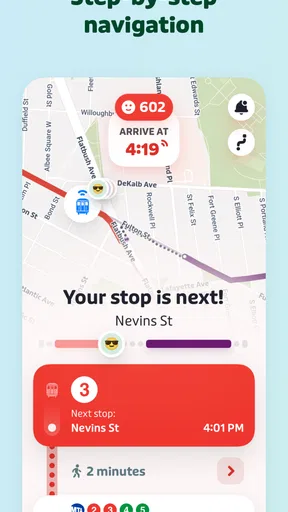
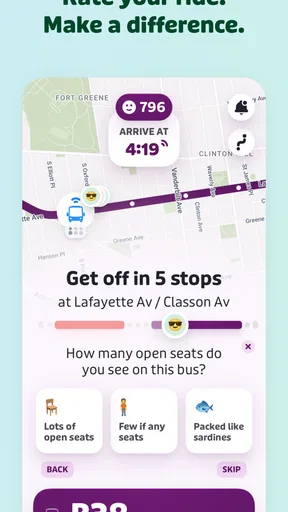

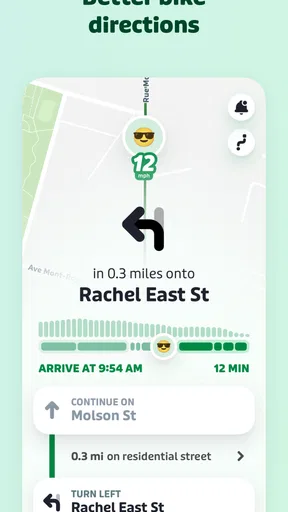
Our Review of Transit - Subway & Bus Times
 Analysis by Appyee
For a first-time user, the hardest part of taking transit is often not finding a route; it is knowing which information to trust when a bus is late, a connection is tight, or a station is unfamiliar. Transit • Subway & Bus Times is designed to make that moment less stressful by bringing local public-transit options and departure information together. I would approach it as a practical guide for deciding what to do next, rather than as a guarantee that every journey will run exactly to plan.
What to expect from a transit-focused app
Transit, Inc. makes this free Maps & Navigation app for people who use buses, trains, and subways in cities where the service is supported. Its reach is broad: it covers major networks such as MTA, NJ Transit, MBTA, SEPTA, BART, MARTA, and CTA, as well as transit in more than a thousand cities. That breadth is useful if you travel between cities or move somewhere new, although the experience naturally depends on the local transit network and the information available there.
The basic idea is reassuringly straightforward: look up nearby service or plan a trip, then use the departure information to make a real-world decision. The app has a 4.6 average from around 337,000 ratings, and it has been installed over 10 million times. Those figures suggest that it has found a substantial audience, but they should not replace checking whether it fits your own city and travel habits. It is rated for Everyone, and the core app is free, with optional in-app purchases priced from $2.99 to $50.00 per item.
Getting started without overthinking it
After installing it, start with the place you actually need to travel from rather than trying to learn every screen at once. Search for a familiar stop, station, or destination, and compare the suggested options with a route you already know. That small test helps you get comfortable with how the app presents transit choices before you depend on it for an unfamiliar trip.
If you are new to the city, use a simple journey first: one origin, one destination, and enough time to notice the suggested departure and connection points. For a daily commute, check the route before your usual leaving time and see whether the displayed options suit your schedule. This is a more dependable first impression than opening the app while already rushing for a bus.
Your first useful trip decision
A realistic first win might be getting from home to a regular appointment. Check the available routes while you are still indoors, choose an option that gives you a little breathing room, then look again before leaving. If the app indicates a delay or disruption, you can consider another route instead of discovering the problem only after reaching the stop. I find that this is where a transit planner earns its place: it can turn uncertainty into a choice, even when it cannot remove every delay.
For a tight connection, pay attention to the shape of the journey, not just the arrival estimate. A route with several changes may look appealing on screen but leave little room for a late vehicle or a slow walk through a station. When I am unfamiliar with a transfer point, I would rather choose a slightly less hurried plan than treat a predicted arrival time as a promise.
Where it helps—and where to stay alert
Transit is especially useful when you regularly combine different public-transport modes or need to compare ways across a city. A visitor can use it to understand which services connect an unfamiliar neighborhood with a destination; a commuter can check whether the usual line still makes sense today. Its wide city coverage makes it a sensible app to try before a trip, but coverage alone does not mean every local route will feel equally polished.
Live information is only as useful as the updates available for a particular service. I would treat departure times as guidance and keep an eye on station displays or operator announcements when a journey matters, especially during disruptions. Likewise, route suggestions can help you compare options, but they cannot judge your personal priorities—such as avoiding stairs, preferring fewer transfers, or leaving extra time—unless those choices are clearly reflected in the route details you see.
Getting Around with Ease
Ever found yourself stranded at a bus stop, squinting at a faded schedule, and wishing you had a magical app to guide you through the urban jungle? Well, let me introduce you to Transit • Subway & Bus Times, the app that’s become my personal transit guru.
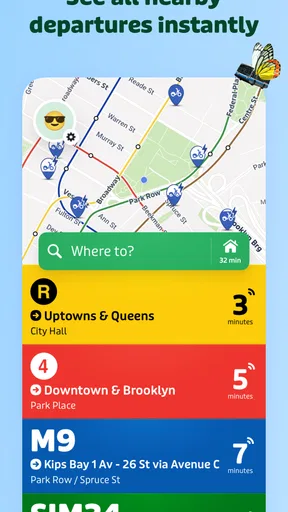
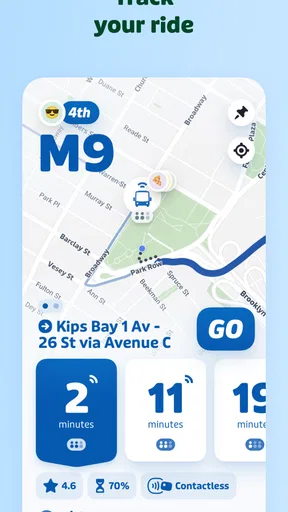
First off, Transit • Subway & Bus Times is like having a local friend who knows all the shortcuts. When I first downloaded it, I was amazed at how swiftly it provided real-time transit info. Whether you’re catching a bus, train, or subway, this app’s got your back with live departure times. I mean, who doesn’t love avoiding those “just missed it” moments?
User-Friendly Interface
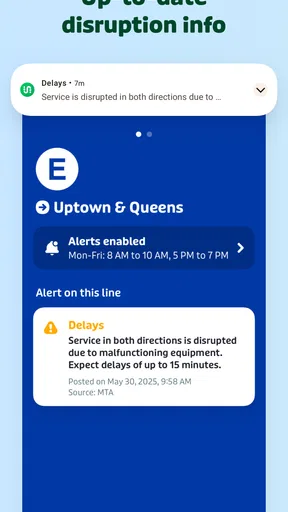
Let’s talk about the interface. It’s clean, intuitive, and super easy to navigate. I appreciated the simplicity—no clutter, just straightforward information. You can quickly check schedules, plan trips, and even get a heads-up on any delays or disruptions. It’s like having a map that speaks your language.
Features that Stand Out
One of my favorite features is the offline functionality. I’ve had those heart-stopping moments when your signal drops, and you’re left map-less. With this app, you can download routes and access them without Wi-Fi. No more panic!
Another highlight is the real-time crowding info. In these times, knowing how crowded a bus or train is can be a game-changer. It’s perfect for those of us who like our personal space.
Integration and Notifications
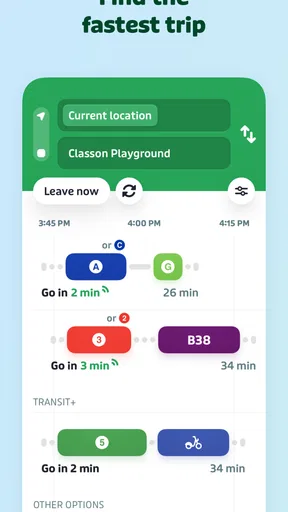
Integration with other apps is seamless. Whether you’re using a bike-share program or hopping on a ride-share, Transit syncs effortlessly to give you a comprehensive travel plan. Plus, the push notifications are a lifesaver. I’ve received reminders to leave on time, ensuring I never miss an appointment again.
Making its features work in everyday travel
For someone who takes the same route most weekdays, the useful habit is to check the next departure before setting off, then reassess if the expected service changes. This avoids the common mistake of treating a schedule as a fixed appointment. If the bus is already approaching, the information can help you decide whether to walk briskly to the stop or take a later option; if the journey includes a transfer, it can prompt you to think ahead rather than focus only on the first leg.
The crowding information is best used as one input, not a guarantee of a quiet ride. When comfort matters, I would compare it with the next available departure and weigh a less crowded vehicle against the extra wait. That trade-off is particularly helpful for a longer ride, while a short hop may not justify waiting. Conditions can change between the time you check and the time you board, so I would keep expectations flexible.
Offline access can be a useful backup when connectivity falters, but it is important to think of saved route information as a fallback, not as live tracking without a connection. A practical approach is to review the journey while you still have service and keep the route details available for reference. That way, a signal drop is less likely to leave you unsure about the plan, while you still know that fresh departure or disruption updates may require a connection.
How it compares with maps and operator apps
A general-purpose map app is often enough when you only need a broad direction or want to combine walking with a simple trip. Transit is more compelling when the decision depends on public-transport departures, service changes, or comparing transit routes across the city. It puts that task at the center instead of treating a train or bus as just one step in a wider map journey.
Official operator apps can be the better companion when you need information tied to one specific network, such as a detailed service notice or a ticketing task. Transit’s advantage is the broader view across different services and cities; its trade-off is that local details and updates may vary. I would use it to plan and compare, then check the operator’s own announcements if an important trip is affected by a major service problem.
That division of labor is especially helpful for visitors. Use Transit to understand how a bus or rail route could get you across town, but do not assume the app replaces local signs, fare rules, or the transit agency’s instructions. For a regular commuter, it can be the quicker everyday overview; for an unusual journey or a complicated disruption, a second source is sensible rather than a sign that the app has failed.
Small habits that prevent avoidable confusion
One easy mistake is searching from the wrong starting point. Before choosing a route, make sure the origin reflects where you will actually board, not merely a nearby landmark with a similar name. This matters most around large stations, campuses, and busy streets, where a short walk to the correct stop can be the difference between catching a service and watching it leave.
Another is comparing journeys only by their estimated duration. I look at the number of transfers and the places where those changes happen, because a nominally quick route may feel stressful if it relies on a close connection. If you are carrying luggage, travelling with someone who walks slowly, or unfamiliar with the station, give yourself more margin than the shortest suggestion seems to require.
Notifications can be useful when you want a reminder to leave, but they work best as a prompt to check the current situation, not as permission to stop paying attention. I would glance at the route again before departure, particularly if weather, an event, or a known service disruption could affect the trip. This keeps the reminder helpful without making it the only source of information.
Who will get the most from it
I would recommend trying Transit if buses, subways, or trains are a regular part of your routine, or if you often need to work out unfamiliar city journeys. It is also a good fit for someone who wants a quick public-transport view without opening a separate tool for every mode. The app is free to start with, so a first-time user can test whether its route information suits their local network before deciding whether any optional purchase is worthwhile.
It is less compelling if you mainly drive, rarely use public transit, or need a single operator’s specialized service information above all else. It may also frustrate someone who expects a predicted departure to be exact or wants every city to offer the same level of detail. For accessibility-sensitive journeys, I would inspect the route carefully and verify important station or vehicle details rather than assume a suggested path meets every need.
The app is developed by Transit, Inc., and version 6.0.13 requires Android 7.0 or later. That makes it accessible to many Android users with supported devices, while the everyday value still comes down to local coverage and the kind of journeys you take. With optional purchases ranging from $2.99 to $50.00 per item, I would begin with the free experience and only consider paying if a specific optional feature clearly solves a need for me.
Final Thoughts
In a world where getting from A to B can sometimes feel like a Herculean task, Transit is a breath of fresh air. It’s reliable, accurate, and incredibly user-friendly. Whether you’re a daily commuter or an occasional traveler, this app is a must-have. Trust me, your future self will thank you when you’re breezing past those poor souls still staring at paper schedules.
So, next time you’re contemplating your route, give this app a try. It might just become your new favorite travel companion!
A sensible way to make the first week count
Rather than rely on it immediately for a journey you cannot miss, try it on a familiar route and compare what it suggests with what happens at the stop. Then test a second trip with a transfer, where seeing the whole journey ahead can be more valuable than checking one departure at a time. That gives you a feel for how the app behaves in your own area and helps you decide when its live information is enough and when to confirm with the operator.
My overall advice is to use Transit as an everyday decision aid, not an infallible timetable. It is most valuable when it helps you choose between realistic options, anticipate a disruption, or feel less lost in a new city. Keep some flexibility for crowded vehicles, missed connections, and changing service, and it can make public transport easier to navigate without pretending that city travel is always predictable.
Privacy and Permissions
See what permissions an app requests and how it handles your data.
- Calendar
- read calendar events plus confidential information
- Contacts
- read your contacts
- Location
- approximate location (network-based), precise location (GPS and network-based)
- Photos/Media/Files
- read the contents of your USB storage, modify or delete the contents of your USB storage
- Storage
- read the contents of your USB storage, modify or delete the contents of your USB storage
- Camera
- take pictures and videos
- Microphone
- record audio
- Other
- view network connections, pair with Bluetooth devices, full network access, change your audio settings, control Near Field Communication, run at startup, draw over other apps, use accounts on the device, control vibration, prevent device from sleeping, read Google service configuration
Verdict
Strengths of Transit - Subway & Bus Times
- Real-time updates enhance commute planning.
- Intuitive interface simplifies navigation.
- Covers multiple cities worldwide.
- Custom alerts for favorite routes.
- Offline mode for uninterrupted access.
Limitations of Transit - Subway & Bus Times
- Ads can be intrusive for some users.
- Occasional inaccuracies in schedule data.
- Limited features in free version.
- High battery consumption with GPS on.
- Requires frequent updates for accuracy.
Similar Picks in This Category
View All
Uber - Request a ride
Uber Technologies, Inc.4.7


inDrive. Rides with fair fares
® SUOL INNOVATIONS LTD4.8

Yandex Go: Taxi Food Delivery
Mikromobilnost LLC Belgrade4.8

Bolt: Request a Ride
Bolt Technology4.8

Rapido: Bike-Taxi, Auto & Cabs
Rapido Bike Taxi4.8
You May Also Like
View All


Frequently Asked Questions
How accurate are the real-time transit updates in the app?
Transit • Subway & Bus Times provides real-time updates sourced directly from transit agencies. While generally accurate, occasional discrepancies may occur due to unexpected delays or technical issues. It's always a good idea to verify with local transit sources if precise timing is crucial for your journey.
Does the app work offline, and if so, what features are available?
Yes, Transit • Subway & Bus Times offers offline capabilities. Users can access offline maps and schedules, which are extremely helpful when traveling in areas with limited connectivity. However, real-time updates and certain features requiring internet access will not function without a connection.
Is the app free to use, and are there any in-app purchases?
The app is free to download and use for basic features such as route planning and schedules. However, it offers in-app purchases for premium features, like personalized notifications and advanced navigation tools, which enhance the overall user experience.
How user-friendly is the interface for first-time users?
The app is designed with a clean and intuitive interface, making it easy for first-time users to navigate. Features like a search bar, clear icons, and step-by-step directions ensure users can quickly find routes and transit options without much hassle, providing a smooth experience.
What regions and transit systems are supported by the app?
Transit • Subway & Bus Times supports a wide range of transit systems in major cities worldwide, including subways, buses, and trains. The app regularly updates its database to include emerging transit networks, ensuring comprehensive coverage for users in various locations.
